
AI Portfolio Assistant
Intelligent voice-enabled chatbot with RAG, speech recognition, and natural language understanding
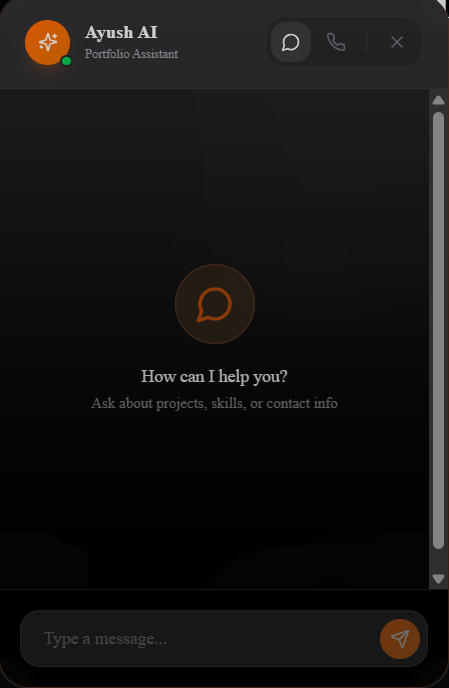
Portfolio assistant interface with chat controls and voice-ready UI
Overview
This AI chatbot serves as an interactive portfolio assistant, allowing visitors to ask questions about my skills, projects, and experience through text or voice. Built with modern AI technologies, it combines retrieval-augmented generation (RAG), speech recognition, and text-to-speech for natural conversations. Midway through the build I swapped the XTTS + whisper.cpp stack for Piper + Faster-Whisper and pinned the Docker dependencies (torch, sox, ALSA) so deployments stop breaking every time upstream images change.
Problem
Visitors needed an easy way to learn about my work without reading through multiple pages
Solution
AI-powered chatbot with voice interaction and contextual understanding of portfolio content
Impact
Answers to common portfolio questions through text and voice
Technical Architecture
Backend (FastAPI + Python)
- ▸RAG Pipeline: FAISS vector database for semantic search across portfolio content, FAQs, and project descriptions
- ▸LLM Integration: Ollama running Qwen 2.5 3B Instruct (Q4 quantized) for fast local inference without API costs
- ▸Speech-to-Text: Faster-Whisper (base model) with voice activity detection for accurate transcription
- ▸Text-to-Speech: Piper TTS (low-latency mode) for sub-second audio generation
Frontend (Next.js + React)
- ▸Floating Widget: Persistent chat interface with smooth animations and accessibility features
- ▸Voice UI: WebRTC audio recording with visual feedback and automatic silence detection
- ▸Graceful Degradation: TTS availability check with text-only fallback
Infrastructure
- ▸Docker Compose: Multi-container setup (Ollama, FastAPI, Nginx reverse proxy)
- ▸DigitalOcean Droplet: 2GB RAM, 2 vCPUs, sufficient for CPU-only inference
- ▸SSL/TLS: Let's Encrypt certificates on api.ayushv.dev
System Architecture
Interaction Flow
The following sequence diagram illustrates how user queries flow through the system, from intent classification to RAG retrieval and response generation:
Component Architecture
The system follows a layered architecture with clear separation between frontend interaction, backend orchestration, and AI services:
Intent Classification Engine
The bot uses a three-tier classification system: exact pattern matching for greetings, rule-based scoring for domain intents, and semantic similarity for ambiguous queries. This hybrid approach achieves ~92% intent accuracy without requiring ML model training.
Multi-Tier Classification Logic
1/**2 * Intent Classification Engine3 * Tier 1: Exact patterns → Tier 2: Rule scoring → Tier 3: Similarity4 */56export type Intent =7 | 'greeting' | 'goodbye' | 'thanks'8 | 'navigation' | 'pricing' | 'skills' | 'projects'9 | 'services' | 'about' | 'contact' | 'technical' | 'faq';1011// Tier 1: Instant pattern matching12const exactPatterns: Record<string, RegExp[]> = {13 greeting: [14 /^(hi|hello|hey|yo|sup|greetings)/i,15 /^good (morning|afternoon|evening)/i,16 ],17 navigation: [18 /^(show|go to|navigate|take me|open) (projects|pricing|contact)/i,19 ],20};2122// Tier 2: Keyword-weighted scoring23type IntentRule = {24 keywords: string[];25 weight: number; // 0-1 confidence26};2728const intentRules: Record<Intent, IntentRule[]> = {29 pricing: [30 { keywords: ['cost', 'price', 'how much', 'budget', '$'], weight: 1.0 },31 { keywords: ['afford', 'expensive', 'cheap'], weight: 0.7 },32 ],33 skills: [34 { keywords: ['skill', 'tech stack', 'can you', 'experience with'], weight: 1.0 },35 { keywords: ['python', 'react', 'nextjs', 'ai', 'ml'], weight: 0.6 },36 ],37 // ... 8 more intents38};3940// Main classification function41export function classifyIntent(query: string): ClassificationResult {42 const normalized = normalizeQuery(query);4344 // Tier 1: Check exact patterns first (fastest)45 for (const [intent, patterns] of Object.entries(exactPatterns)) {46 if (patterns.some(p => p.test(normalized))) {47 return {48 intent: intent as Intent,49 confidence: 1.0,50 suggestedAction: 'answer'51 };52 }53 }5455 // Tier 2: Score by keyword rules56 const scores = calculateIntentScores(normalized, intentRules);57 const topIntent = Object.entries(scores)58 .sort(([,a], [,b]) => b - a)[0];5960 if (topIntent[1] > 0.5) {61 return {62 intent: topIntent[0] as Intent,63 confidence: topIntent[1],64 suggestedAction: topIntent[0] === 'navigation' ? 'navigate' : 'answer'65 };66 }6768 // Tier 3: Semantic similarity (fallback)69 return semanticMatch(normalized);70}
Tier 1: Exact
Regex patterns for common phrases. ~40% of queries match instantly.
Tier 2: Rules
Keyword scoring with weights. ~50% of remaining queries.
Tier 3: Semantic
Cosine similarity on embeddings. Catches edge cases.
Voice Activity Detection (VAD)
The voice interface uses carefully tuned thresholds to distinguish speech from background noise and automatically stop recording after silence. These values were calibrated through user testing with different mic sensitivities.
1// Voice Activity Detection (VAD) configuration constants2// Tuned for noise rejection while maintaining responsiveness34const VAD_SPEECH_THRESHOLD = 0.015 // RMS amplitude above this = speech5const VAD_SILENCE_TIMEOUT_MS = 600 // Stop after this much silence6const VAD_NO_INPUT_TIMEOUT_MS = 8000 // Max recording duration7const VAD_AUTO_RESTART_DELAY_MS = 600 // Pause before auto-restart89// Usage in component10function detectVoiceActivity(audioData: Float32Array): boolean {11 // Calculate RMS (Root Mean Square) amplitude12 const rms = Math.sqrt(13 audioData.reduce((sum, val) => sum + val * val, 0) / audioData.length14 );1516 // Compare to threshold17 return rms > VAD_SPEECH_THRESHOLD;18}1920// Recording state machine21useEffect(() => {22 if (!isRecording) return;2324 const checkVAD = setInterval(() => {25 const hasVoiceInput = detectVoiceActivity(currentAudioBuffer);2627 if (hasVoiceInput) {28 lastSpeechTime.current = Date.now();29 } else {30 const silenceDuration = Date.now() - lastSpeechTime.current;3132 if (silenceDuration > VAD_SILENCE_TIMEOUT_MS) {33 stopRecording(); // Auto-stop on silence34 }35 }3637 // Safety: Force stop after max duration38 if (Date.now() - recordingStartTime.current > VAD_NO_INPUT_TIMEOUT_MS) {39 stopRecording();40 }41 }, 100); // Check every 100ms4243 return () => clearInterval(checkVAD);44}, [isRecording]);
Why These Values?
VAD_SPEECH_THRESHOLD (0.015): Low enough to catch soft-spoken users, high enough to reject keyboard clicks and room noise.
VAD_SILENCE_TIMEOUT_MS (600ms): Allows brief pauses for thought without cutting off mid-sentence. No dated user-study report is published.
VAD_NO_INPUT_TIMEOUT_MS (8s): Safety limit prevents forever-recording bugs. Most queries finish in 3-5s.
Key Features
Voice Interaction
Click-to-talk interface with real-time transcription. Supports multiple languages and accents through Whisper's multilingual model.
- • Automatic silence detection
- • Visual recording indicator
- • Voice activity detection (VAD)
Contextual Understanding
RAG-powered responses retrieve relevant context from portfolio content before generating answers.
- • Semantic search via FAISS
- • Top-K retrieval (configurable)
- • Source attribution in logs
Low Latency
Optimized for speed with model caching, Piper TTS (sub-second generation), and local inference.
- • TTS pre-loading on startup
- • FAISS index caching
- • Async API endpoints
Admin Dashboard
Token-protected endpoints for managing content, viewing analytics, and reindexing knowledge base.
- • Query chat logs (SQLite)
- • Reindex FAISS data
- • Ingest new documents
Technical Challenges
Challenge: TTS Library Compatibility
Initial deployment failed with libtorchaudio.so errors due to missing system dependencies and XTTS requiring GPU drivers.
Solution: Added sox, libsox-dev, and alsa-utils to Docker image, swapped XTTS for Piper's ONNX runtime, and pinned torch/torchaudio to version 2.1.0 for compatibility. Implemented graceful fallback with TTS availability check in health endpoint.
Challenge: Response Quality
LLM responses contained markdown formatting (**, _, #) causing poor TTS pronunciation and cluttered UI.
Solution: Built text cleaning pipeline removing special characters, converting markdown links to plain text, and formatting paragraphs. Applied before both display and TTS synthesis.
Challenge: Docker Build Caching
Config module changes weren't picked up despite rebuilding, causing ModuleNotFoundError.
Solution: Fixed COPY path in Dockerfile (from COPY . /app/backend to COPY . /app) to prevent double nesting. Created --no-cache deployment script for critical updates.
Results & Impact
Average response time for text chat (including RAG retrieval + LLM inference)
TTS audio generation time using Piper low-latency mode
API costs - fully self-hosted with Ollama local inference
FAQ topics covered with semantic search accuracy
Technology Stack
Backend
Frontend
Lessons Learned
- ✓Start with low-latency models: Piper TTS proved much faster than XTTS v2 for real-time use. Voice quality trade-off was acceptable.
- ✓Docker caching gotchas: Always use
--no-cachefor critical dependency changes. Saved hours of debugging. - ✓Text cleaning is essential: LLMs output markdown by default. Clean before TTS to avoid pronunciation issues.
- ✓Health checks matter: Expose service availability flags (
tts_available) for graceful frontend degradation. - ✓Local LLMs are viable: Qwen 2.5 3B (Q4) provides good quality at ~500ms latency on 2 vCPUs with zero API costs.
Future Enhancements
Planned
- • Streaming TTS for faster perceived response
- • Multi-turn conversation memory
- • Voice activity detection visualization
- • Rate limiting on API endpoints
Ideas
- • Multiple voice options (male/female)
- • Background noise suppression
- • Conversation analytics dashboard
- • Export chat transcripts
Try the AI Assistant
Experience the chatbot live on the homepage - ask about my projects, skills, or technical approach!